
9 Steps Involved in Developing a Website

9 Steps Involved in Developing a Website: Start to Launch
The steps involved in developing a website, at a glance
1. Discovery
Every proper project starts by understanding what the website actually needs to achieve — your business goals, who your audience is, what your competitors are doing, and what’s not working about your current site if you have one. This stage is more conversation than production: expect questions about your customers, your sales process, and what success actually looks like for the finished site. Skipping this stage is the single most common reason projects drift, because decisions later on have nothing solid to be judged against.
2. Planning and site structure
With goals defined, the next stage maps out what the website actually needs to contain: which pages, how they connect, and what a visitor’s path through the site should look like. This is usually expressed as a sitemap. Good planning here keeps navigation simple — a visitor should be able to reach any important page in a small number of clicks — and gives you an early, concrete list of what content you’ll need to provide.
3. Wireframing
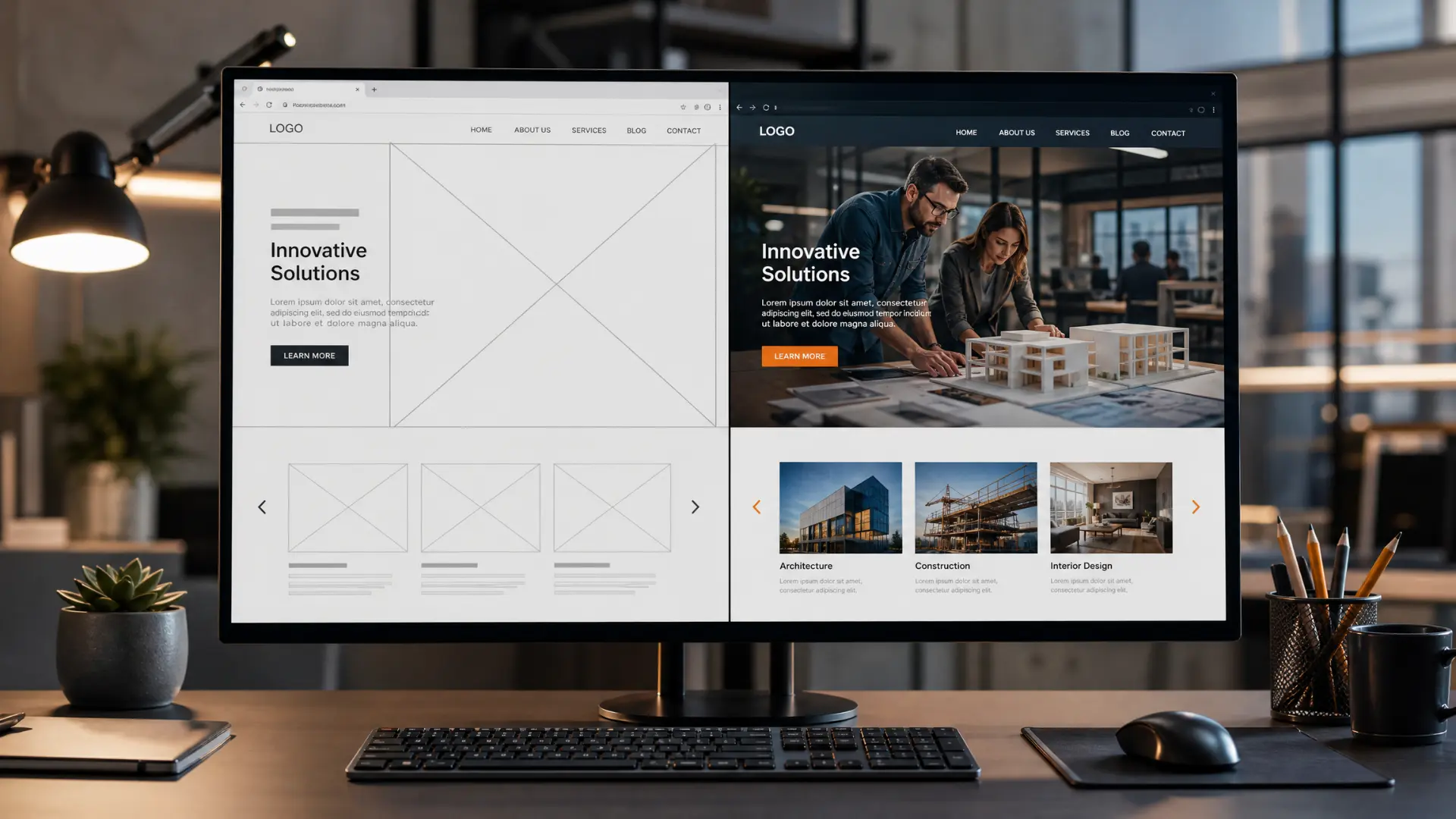
Before any visual design happens, wireframes lay out the skeleton of each key page — where the headline sits, where the navigation goes, where a call to action appears — without colour, imagery or branding to distract from the structure. This is the cheapest, fastest point to catch a layout problem, because changing a box on a wireframe takes minutes; changing a fully designed page takes considerably longer.
4. Design
This is where your brand, colours, typography and imagery get applied to the wireframe structure. A good design stage isn’t just about what looks attractive — it’s making sure the visual hierarchy still guides visitors toward what you actually want them to do on each page. Expect at least one or two rounds of feedback here; this is the stage where your input has the most influence on the finished look of the site.
5. Content
Somewhere alongside design, the actual words, images and video for the site get written, sourced or produced. In practice, this stage causes more delays than any other, because content often depends on decisions and material only you can provide — service descriptions, staff bios, product photography. Getting a head start on content early, even in rough form, is one of the most effective ways to keep a project on schedule.
6. Development
This is where the approved design and content actually get built into a working website — the HTML, CSS and any back-end functionality (forms, CRM integrations, e-commerce, booking systems) that make the site do what it needs to do, not just look right. For most business sites this happens on a content management system so you can make simple edits yourself after launch, rather than needing a developer for every text change.
7. Testing
Before anything goes live, a proper build gets tested across browsers, screen sizes and devices — checking that every link works, every form submits correctly, and the site behaves the same way for a visitor on a five-year-old Android phone as it does on the latest iPhone. Performance and technical SEO checks belong here too, since problems found before launch are far cheaper to fix than problems found after.

8. Launch
Going live involves more than flicking a switch: final DNS and domain configuration, SSL setup, redirects from any old URLs so search rankings and existing links aren’t lost, and a final check that analytics and tracking are recording correctly from the first visitor onward.
9. Post-launch support
A website’s job starts at launch, not ends there. Security updates, performance monitoring, backups and the inevitable small tweaks and content changes all continue well after the site goes live. A project that ends the moment the site is published, with no plan for what happens next, tends to age badly within a year or two.

How long does this actually take?
Timelines vary enormously with scope. As an illustrative planning range, a straightforward brochure site may take around six to ten weeks, while e-commerce, large content migrations or custom integrations can take considerably longer. Treat any timetable as project-specific rather than guaranteed: content readiness, feedback turnaround, third-party integrations and approval cycles often decide the final launch date.
What this means for you as the client
Your influence over the finished site is front-loaded. Discovery, planning and design are where a clear brief, prompt feedback and ready content genuinely change the outcome. By the development and testing stages, most of what happens is technical execution of decisions already made — which is exactly why getting the early stages right matters more than it might seem at the time. If you are still deciding who should run that process, our guide to the factors to consider when selecting a web developer gives you a technical due-diligence checklist before you sign.
Technical performance also is not just a developer concern. Google’s current Core Web Vitals guidance defines three key user-experience metrics: Largest Contentful Paint (LCP) should be 2.5 seconds or less, Interaction to Next Paint (INP) 200 milliseconds or less, and Cumulative Layout Shift (CLS) 0.1 or less, measured at the 75th percentile of visits. These checks belong in development and testing, then continue after launch with real-user data.
Frequently asked questions
Which stage of building a website usually takes the longest?
Development is usually the largest single block of time, but content and feedback turnaround are the stages most likely to extend the overall timeline, since both depend on input only the client can provide.
Can some of these stages happen at the same time?
Yes — content creation commonly runs in parallel with design and the early part of development, since it doesn’t need to wait for every other stage to finish. Testing, however, only really works once development is substantially complete.
Ready to see what this looks like for your project?
If you’re weighing up a new website or a redesign, we’re happy to walk through what each stage would actually involve for your specific project — no obligation.